Steven Park
SVG Tiny Portable/Secure
🚧 DRAFT: Request For Comments (RFC) in draft in IETF https://www.ietf.org/archive/id/draft-svg-tiny-ps-abrotman-07.html
- SVG - Scalable Vector Graphics
Usage
Compatibility across multiple systems is the primary driver of SVG Tiny Portable/Secure
Aspects
- Renders fast
- Memory-exhaustion proof
- No motion
Use cases:
- Email Authenticity
- BIMI - Brand Indicators for Message Identification
- see bimigroup.org)
- see IETF draft RFC BIMI
- BIMI - Brand Indicators for Message Identification
Requirements
SVG Tiny Portable/Secure
- https://www.ietf.org/archive/id/draft-svg-tiny-ps-abrotman-07.html
- https://www.oasis-open.org/committees/relax-ng/compact-20021121.html
- http://bimigroup.org/resources/SVG_PS-latest.rnc.txt
The file size of SVG Tiny PS documents SHOULD be as small as possible, and SHOULD NOT exceed 32 kilobytes. That size should be evaluated when the document is uncompressed.
An SVG Tiny PS document MUST include at least two colors when rendered.
https://knowledge.workspace.google.com/admin/security/create-a-bimi-svg-file-detailed-steps
width=”96” height=”96”
solid color background
a. Minimum height and width is 96 pixels.
b. Image size must be specified in absolute pixels. Example: width=”96” height=”96”
c. Don’t use relative dimensions to specify image size. Example: width=”100%” height=”100%”
d. The logo image should be centered in a square.
e. The logo image should appear on a solid color background. Transparent backgrounds might not display as expected.
f. SVG file size should be 32 KB or smaller.
g. SVG file should include the
Editing an SVG
Tool Options
- Online
- Professional Apps
- Free Apps
- Shell Scripts
- Vim
Below uses Inkscape and Vim to get it under 32 KB.
Inkscape

Downloand & Install: https://inkscape.org/release/inkscape-1.4.4/
Here are some steps to editing a SVG with Inkscape.
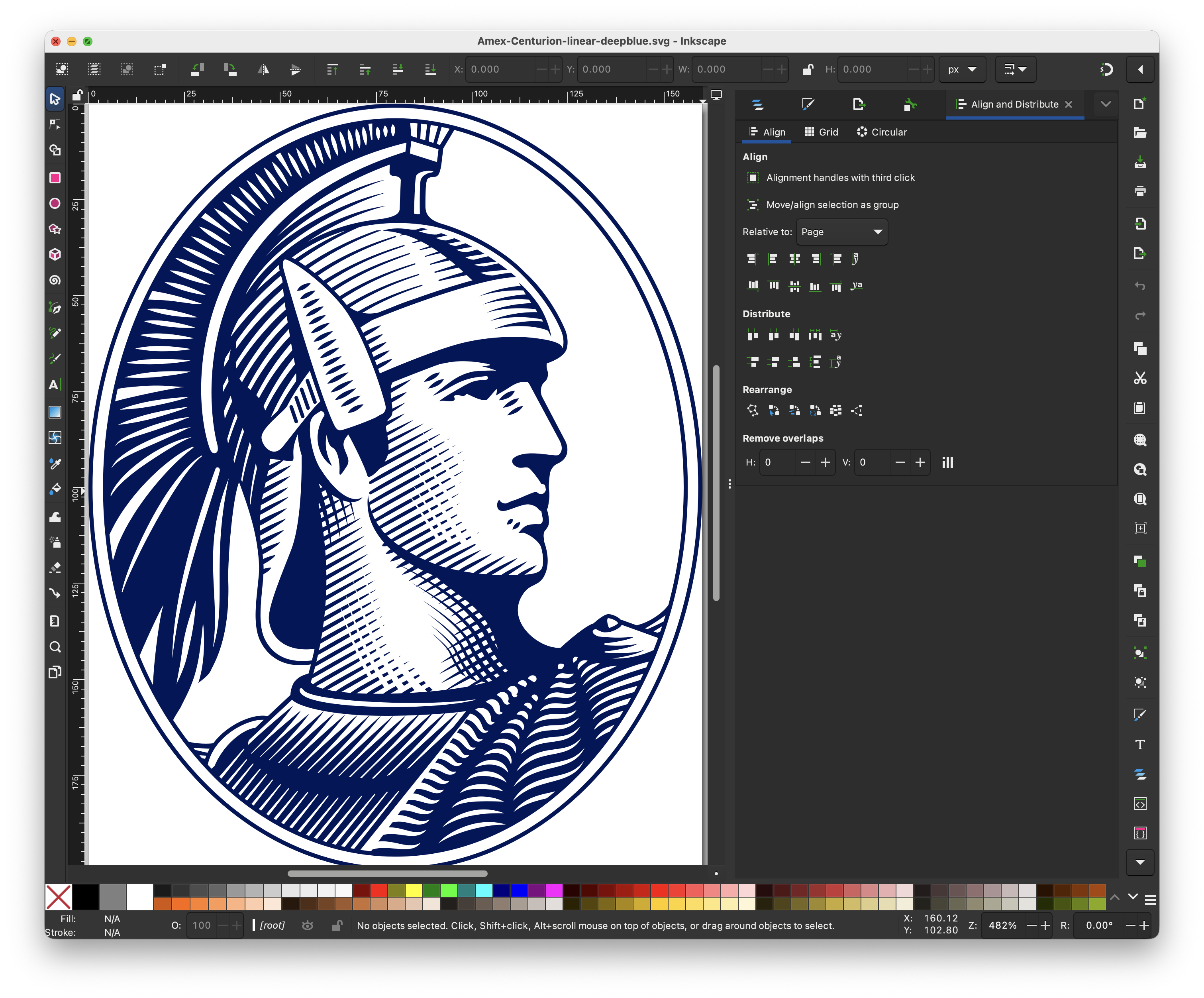
1. Open SVG w/ Inkscape
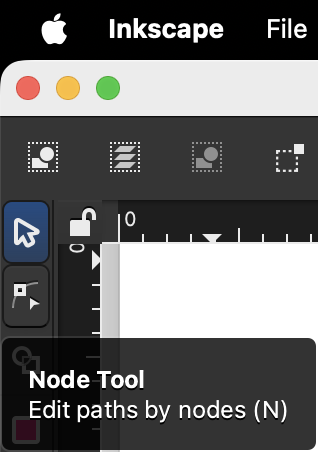
2. Click on Node Tool icon
(see left horizontal toolbar)

3. Click SVG path with Node Tool
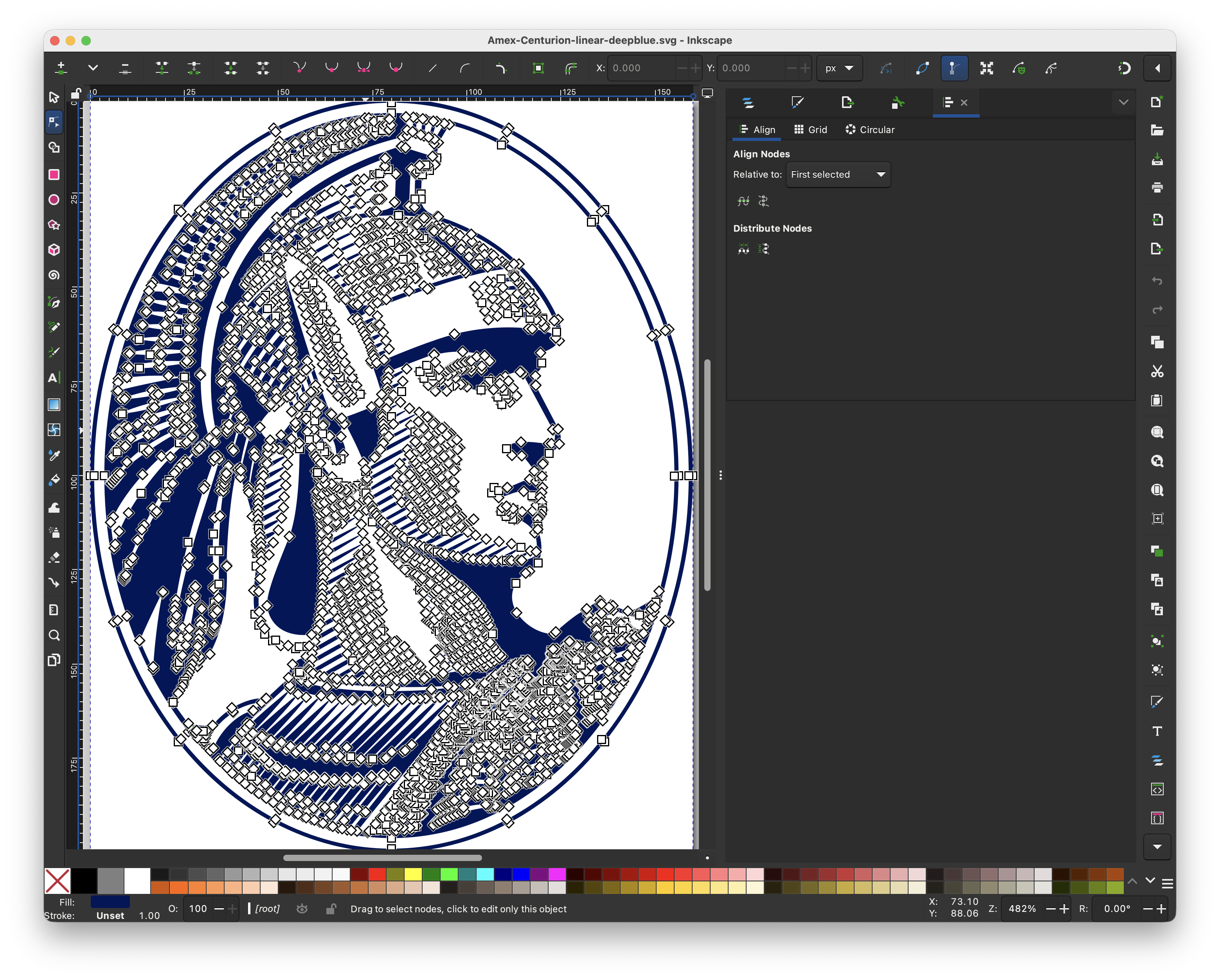
See the thousands of nodes now shown
4. Zoom in + key
See the multiple nodes for the eye
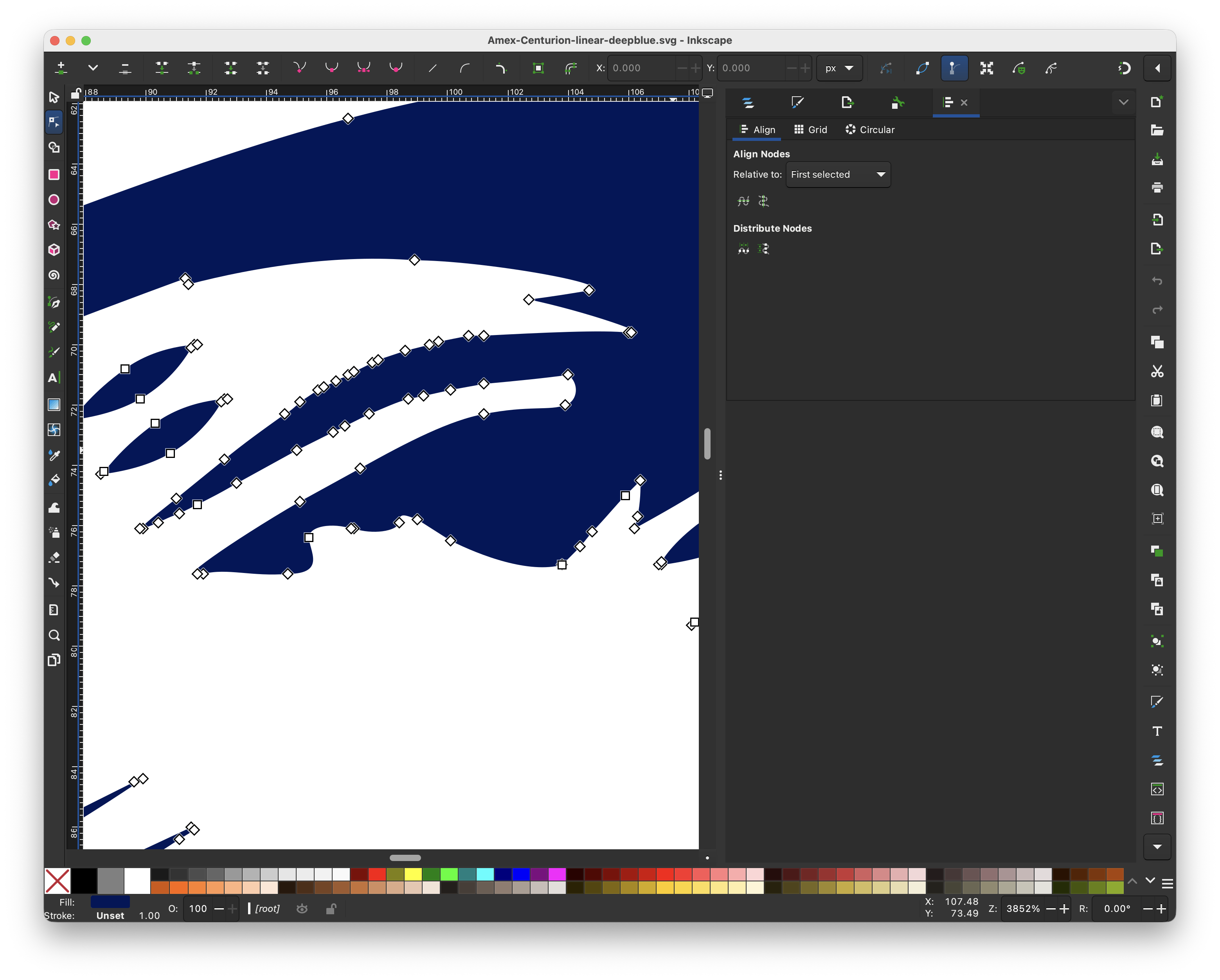
Ideally after simplifying the nodes there can be fewer like this
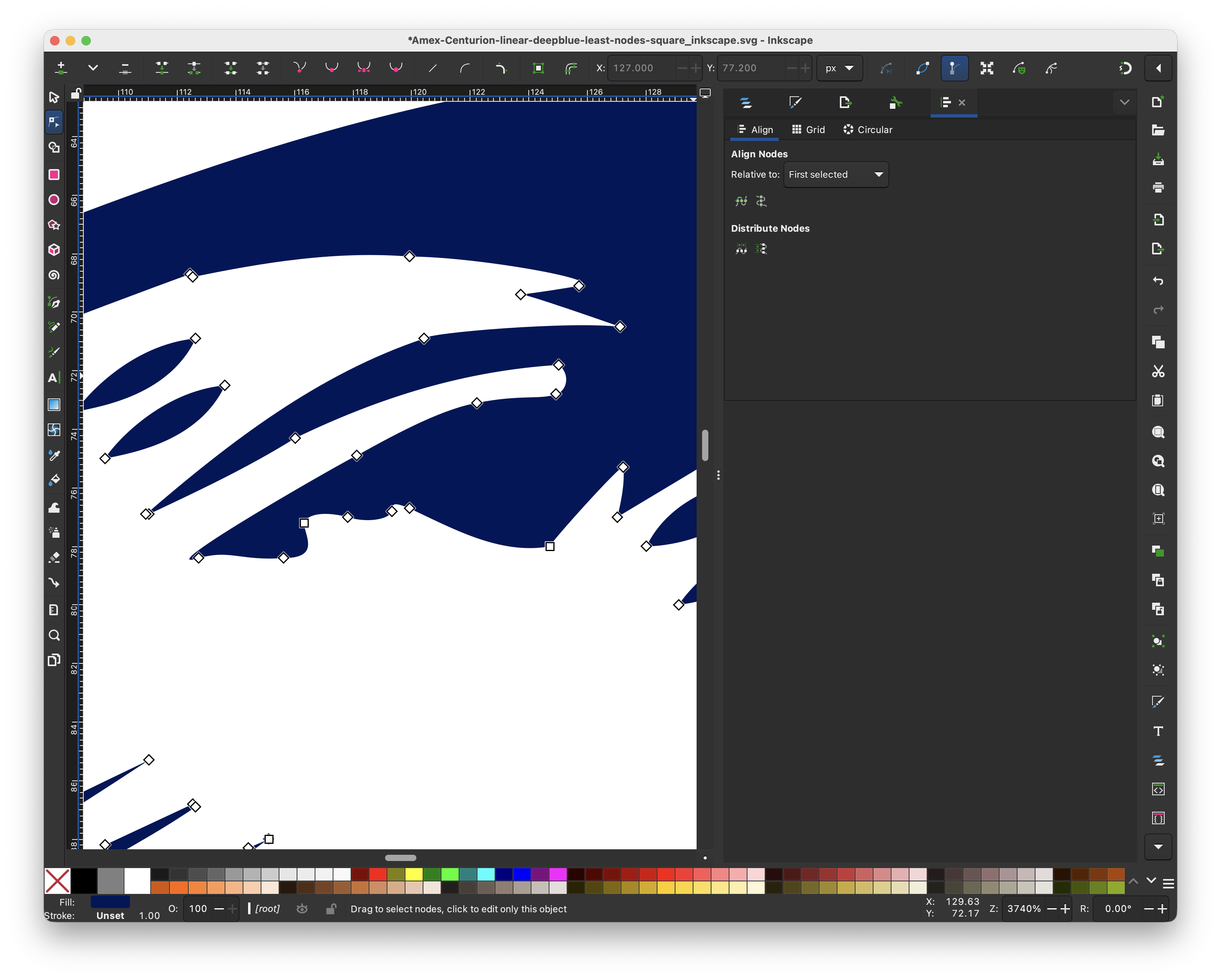
5. Simplify nodes
Repeat the editing of deleting nodes.
6. Save file
7. Check file size
In this example,
- Original had:
14131SVG path coordinates - Edited had:
5529SVG path coordinates
That’s a reduction of: 61% of 99 KB file
39 KB are still left (7 KB over the 32 KB max of BIMI)
Text Editor
Use a simple text editor to replace <svg>, <metadata>, and other extraneous data added by Inkscape.
Objectives
- Reduce SVG file size
- Add key attributes for SVG Tiny Portable/Secure
- Add Readability
- Add Accessibility
1. Replace <svg> extraneous data
Example Inkscape <svg> data of 1,236 bytes:
<?xml version="1.0" encoding="UTF-8" standalone="no"?>
<svg
   width="160"
   height="200"
   viewBox="0 0 160 200"
   version="1.1"
   id="svg1"
   sodipodi:docname="Amex-Centurion-linear-deepblue-least-nodes-reduced-decimal-to-tenth-square_inkscape.svg"
   inkscape:version="1.4.4 (dcaf3e7, 2026-05-05)"
   xmlns:inkscape="http://www.inkscape.org/namespaces/inkscape"
   xmlns:sodipodi="http://sodipodi.sourceforge.net/DTD/sodipodi-0.dtd"
   xmlns="http://www.w3.org/2000/svg"
   xmlns:svg="http://www.w3.org/2000/svg"
   xmlns:rdf="http://www.w3.org/1999/02/22-rdf-syntax-ns#"
   xmlns:cc="http://creativecommons.org/ns#"
   xmlns:dc="http://purl.org/dc/elements/1.1/">
  <defs
     id="defs1" />
  <sodipodi:namedview
     id="namedview1"
     pagecolor="#ffffff"
     bordercolor="#000000"
     borderopacity="0.25"
     inkscape:showpageshadow="2"
     inkscape:pageopacity="0.0"
     inkscape:pagecheckerboard="0"
     inkscape:deskcolor="#d1d1d1"
     inkscape:zoom="4.815"
     inkscape:cx="99.169263"
     inkscape:cy="88.785047"
     inkscape:window-width="2042"
     inkscape:window-height="1112"
     inkscape:window-x="0"
     inkscape:window-y="30"
     inkscape:window-maximized="0"
     inkscape:current-layer="svg1" />
Change to:
<svg xmlns="http://www.w3.org/2000/svg" width="160" height="200" viewBox="0 0 160 200">
2. Add attributes and <title>, <desc>, and <g>
Reduced from original 1,236 bytes to 271 bytes:
<svg xmlns="http://www.w3.org/2000/svg" width="160" height="200" viewBox="0 0 160 200" version="1.2" baseProfile="tiny-ps" aria-labelledby="svg-title svg-desc">
<title id="svg-title">American Express</title>
<desc id="svg-desc">Oval Centurion Cameo</desc>
<g id="design">
ⓘ IMPORTANT: For readability consider adding <title>
ⓘ IMPORTANT: For accessibility consider adding <desc>
2. Add <rect>, <circle>, or <ellipse> white background:
⚠ WARNING: At least two colors are required per SVG Tiny Portable/Secure to be compatible with light mode, dark mode, etc.
The suggestion here is to provide a white background.
Examples,
<ellipse cx="80" cy="100" rx="80" ry="100" fill="#ffffff" />
<rect x="0" y="0" width="160" height="200" fill="#ffffff" />
3. Remove nodetypes and <metadata>
Example Inkscape metadata:
Remove 5791 bytes of sodipodi:nodetypes attribute on <path>
       id="path1"
       sodipodi:nodetypes="scscscccscccscccsscccscscscscscccsccccsccscccsccccccccccccccccccccccccccccccccccccccccccccccccccccccccccccccccccccccccccccccccccccccccsccccccccccccccccccccccccccccccccccccccccccccccssccccccccccccccccccccccccccccccccccccccccccccccccccccccccccccccccccccscccccccccccccccccccccccccccccccccccccccccccccccccccccccccccccccccccccccccccccccccccccccccccccccccccccccccccccccccccccccccccccccccccccccccccccccccccccccccccccccccccccccccccccccccccccccccccccccccccccccccccccccccccccccccccccccccccccccccccccccccccccccccccccccccccccccccccccccccccccccccccccccccccccccccccccccccccccccccccccccccccccccccccccccccccccccccccccccccccccccccccccccccccccccccccccccccccccccccccccccccccccccccccccccccccccccccccccccccccccccccccccccccccccccccccccccccccccccccccccccccccccccccccccccccccccccccccccccccccccccccccccccccccccccccccccccccccccccccccccccccccccccccccccccccccccccccccccccccccccccccccccccccccccccccccccccccccccccccccccccccccccccccccccccccccccccccccccccccccccccccccccccccccccccccccccccccccccccccccccccccccccccccccccccccccccccccccccccccccccccccccccccccccccccccccccccccccccccccccccccccccccccccccccccccccccccccccccccccccccccccsccccccccccccccccccccccccccccccccccccccccccccccccccccccccccccccccccccccccccccccccccccccccccccccccccccccccccccccccccccccccccccccccccccccccccccccccccccccccccccccccccccccccccccccccccccccccccccccccccccccccccccccccccsccccccscccccccccccccccsccccccccccccccccccccccccccccccccccccccccccccccccccccccccccccccccccccccccscccccccccccccccccccccccccccccccccccccccccccccccccccccccccccccccccccccccccccccccccccccccccccccccccccccccccccccccccccccccccccccccccccccccccccccccccccccccccccccccccccccccccccccccccccccccccccccccccccccccccccccccccccccccccccccccccscccccccccccccccccccccccccccccccccccccccscccccccccccccccccccccccccccccccccccccccccccccccccccssccccccccccccccccccccccccccccccccccccccscccccccccccccccccccsccccccccccccccccccccccccccccccccccccccccccccccccccccccccccccccccccccccccccccccccccccccccccccccccccccccccccccccccccccccccccccccccccccccccccsccsccccccccccccccccccccccccccccccccccccccccccccccccccccccccccccccccccccccccccccccccccccccccccccccccccccccccccccccccccccccccccccccccccccccccccccccccccccccccccccccccccccccccccccccccccccccccccccccccccccccccccccccccccccccccccccccccccccccccccccccccccccccccccccccccccccccccccccccccccccccccccccccccccccccccccccccccccccccccccccccccccccccccccccccccccccccccccccccccccccccccccccccccccccccccccccccccccccccccccccccccccccccccccccccccccccccccccccccccccccccccccccsccccccccccccccccccccccccccscccccccccccccccccccccccccccccccccccccccccccccccccccccccscccccccccccccccccccccccccccccccccccccccccccccccccccccccccccccccccccccccccccccccccccccccccccccccccccscccccccccccccccccccccccccccccccccccccccccccccccccccscccccccccccccccccsccccccccccccccccccscccccccccccccccccccccccccccccscccccccccccccccccccccccccccccccccccccccccccccccccccccccccccccccccccccccccccccccccccccccccccccccccccccccccccccccccccccccccccccccccccccccccccccccccccccccccccccccccccccccccccccccccccccccccccccccccccccccccccccccccccccccccccccccccccccccccccccccccccccccccccccccccccsccccccccccccccccccccccccccccccccccccccccccccccccccccccccccccccccccccccccccccccccccccccccccccccccccccccccccccccccccccccccccccccccccccccccccccccccccccccccccccccccccccccccccccccccccccccccccccccccccccccccccccccccccccccccccccccccccccccccccccccccccccccccccccccccccccccccccccccccccccccccccccccccccccccccccccccccccccccccccccccccccsccccccccccccccccccccccccccccccccccccccccccccccccccccccccccsccscccccccccccccccccccccccccccccccccccccccccccccccccccccccccccccccccccccccccccccccccccccccccccccccccccccccccccccccccccccccccccccccccccccccccccccccccccccccccccccccccccccccccccccccccccccccccccccccccccccccccccccccccccccccccccccccccccccccccccccccccccccccccccccccccccccccccccccccccccccccccccccccccccccccccccccccccccccccccccccccccccccccccccccccccccccccccccccccccccccccccccccccccccccccccccccccccccccccccccccccccccccccccccccccccccccccccccccccccccccccccccccccscccccccccccccccccccccccccccccccccccccccccccccccccccccccccccccccccccccccccccccccccccccccccccccccccccccccccccccccccccccccccccccccccccccccccccccccccccccccccccccccccccccccccccccccccccccccccccccccccccccccccccccccccccccccccccccccccccccccccccccccccccccccccccccccccccccccccccccccccccccccccccccccccccccccccccccccccccccccccccccccccccccccccccccccccccccccccccccccccccccccccccccccccccccccccccccccccccccccccccccccccccccccccccccccccccccccccccccccccccccscccccccccccccccccccccccccccccccccccccccccccccccccccccccccccccccccccccccccccccccccccccccccccccccccccccccccccccccccccccccccccccccccccccccccccccccccccccccccccccccccccccccccccccccccccccccccccccccccccccccccccccccccccccccccccccccccccccccccccccccccccccccccccccccccccscccccccccccccccccccccccccccccccccccccccccccccccccccccccccccccccccccccccccccccccccccccccccccccccccccccccccccccccccccccccccccccccccccccccccccccccccccccccccccccccccccccccccccccccccccccccccccccccccccccccccccccccccccccccccccccccccccccccccccccccccccccccccccccccccccccccccccccccccccccccccccccccccccccccccccccccccccccccccccccccccccccccccccccccccccccccccccccccccccccccccccccccccccccccccccccccccccccccccccccccccccccccccccccccccccccccccccccccccccccccccccccccccccccccccccccccccccccccccccccccccccccccccccccccccccccccccccccccccccccccccccccccccccccccccccccccccccccccccccccccccccccccccccccccccccccccccccccccccccccccccccccccccccccccccccccccccccccccccccccccccccccccccccccccccccccccccccccccccccccccccccccccccccccccccccccccccccccccccccccccccccccccccccccccccccccccccccccccccccccccccccccccccccccccccccccccccccccccccccccccccccccccccccccccccccccccccccccccccccccccccccccccccccccccccccccccccccccccccccccccccccccccccccccccccccccccccccccccccccccccccccccccccccccccccccccccccccccccccccccccccccccccccccccccccccccccccccccccccccccccccccccccccccccccccccccccccccccccccccccccccccccccccccccccccccccccccccccccccccccccccccccccccccccccccccccccccccccccccccccccccccccccccccccccccccccccccccccccccccccccccccccccccccccccccccccccccccccccccccccccccccccccccccccccccccccccccccccccccccccccccccccccsccccccccccccccccccccccccccccccsccccccc"
Remove <metadata> 176 bytes, if present
  <metadata
     id="metadata1">
    <rdf:RDF>
      <cc:Work
         rdf:about="">
        <dc:title>American Express</dc:title>
      </cc:Work>
    </rdf:RDF>
  </metadata>
Vim

💡 MacOS & Linux come with Vim
Objectives
- Reduce SVG file size
Strategies
- Reduce decimal precision
- Remove thousandth and beyond digits from decimals
- example: change
0.12345into0.12
- example: change
- Round hundredth decimal place up or down and remove it
- example: change
0.11into0.1 - example: change
0.15into0.2
- example: change
- Remove thousandth and beyond digits from decimals
- Remove zeros
- Remove zeros trailing
zeros, example: change0.10into0.1 - Remove leading
zeros, example: change0.1into.1 - Remove leading
negative zeros, example: change-0.1into-.1
- Remove zeros trailing
- Remove spaces
- Remove spaces before and after single letter commands
M,m,L,l,H,h,C,c,S,s,Q,q,T,t,A,a,Z,z- example: change
100 C 38.7into100C38.7
- example: change
- Remove spaces before and after single letter commands
Here are some steps to editing a SVG with Vim.
1. Create file of VIM commands
VIM commands
Save in reduce-svg-size.vim file
" Remove thousandth place in decimals "
:%s/\(\.\d\d\)\d\+/\1/g

" Remove [1234] after decimal and tenth place (~round down) "
:%s/\(\.\d\)[1234]/\1/g

" Remove [56789] after decimal and tenth place (~round up) "
:%s/\.0[56789]/\.1/g
:%s/\.1[56789]/\.2/g
:%s/\.2[56789]/\.3/g
:%s/\.3[56789]/\.4/g
:%s/\.4[56789]/\.5/g
:%s/\.5[56789]/\.6/g
:%s/\.6[56789]/\.7/g
:%s/\.7[56789]/\.8/g
:%s/\.8[56789]/\.9/g

:%s/0\.9[56789]/1/g
:%s/1\.9[56789]/2/g
:%s/2\.9[56789]/3/g
:%s/3\.9[56789]/4/g
:%s/4\.9[56789]/5/g
:%s/5\.9[56789]/6/g
:%s/6\.9[56789]/7/g
:%s/7\.9[56789]/8/g
:%s/8\.9[56789]/9/g

" Remove leading zero if right before decimal "
:%s/-0\./-\./g

" Remove leading zero if right before decimal "
:%s/\(\D\)0\./\1\./g

" trip space before and after 'c' "
:%s/\sc\s/c/g

" Strip space before and after 'C' "
:%s/\sC\s/C/g

" Strip space before and after 'l' "
:%s/\sl\s/l/g

" Strip space before and after 'L' "
:%s/\sL\s/L/g

" Strip space before '-' "
:%s/\s-/-/g

" Strip space before 'z' "
:%s/\sz/z/g

" Strip space after 'z' "
:%s/z\s/z/g

" Strip space before 'Z' "
:%s/\sZ/Z/g

" Strip space after 'Z' "
:%s/Z\s/Z/g

" Strip space before 'm' "
:%s/\sm/m/g

" Strip space after 'm' "
:%s/m\s/m/g

" Strip space after 'M' "
:%s/M\s/M/g

" Strip trailing zero "
:%s/\(\.\d\)0/\1/g

" Replace decimal zero with zero "
:%s/\(\D\)\.\(0\)\(\D\)/\1\2\3/g

" Replace decimal zero with zero "
:%s/\(\d\)\.0/\1/g

" Write and Quit "
:wq
2. Open SVG with Vim
vi {SVG-FILE}
or
vim {SVG-FILE}
3. Run VIM commands in VIM
:source reduce-svg-size.vim
4. View file info
ls -ltr {SVG-FILE}
Reference
SVG Tiny Portable/Secure
https://www.oasis-open.org/committees/relax-ng/compact-20021121.html
- MoveTo (M / m): Lifts the pen and moves it to a new starting point without drawing a line.
- LineTo (L / l): Draws a straight line from the current point to a new point.
- Horizontal Line (H / h): Draws a straight horizontal line.Vertical Line (V / v): Draws a straight vertical line.
- Cubic Bézier (C / c and S / s): Draws smooth curved lines using control points to bend the curve.
- Quadratic Bézier (Q / q and T / t): Draws simpler curves using a single control point.
- Arc (A / a): Draws a section of a circle or ellipse.
- ClosePath (Z / z): Draws a straight line from the current point back to the starting point to seal the shape.